|
1-Port Ethernet to CAN Bus Adapter |
 |
 |
 |
|
|
|
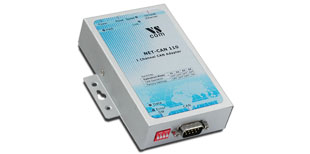
The VScom NET-CAN 110 provides CAN-BUS communication over Ethernet. It provides completely secured communication for both data transfer and configuration to the attached CAN devices.
CAN BUS is widely used in industrial applications as well as in automotive monitoring and control. The VScom NET-CAN can be used to monitor the data traffic as well as sending control information.
NET-CAN supports two operating modes: Driver Mode and TCP Raw Server. The Driver Mode basically requires the installation of a virtual com-port driver, which makes the network fully transparent for the application.
The TCP Raw Server Mode doesn't require the virtual com-port driver installation, so the communication will be handled directly via IP address and port number. NET-CAN provides different software tools to interface the user application:
• The ASCII conversion protocol is useful in developing and testing any CAN-BUS configuration. Users just open the serial port via a Terminal Program or connect directly via Telnet, and have a simple way to talk to the CAN controller. It can also be used to manually transmit and receive CAN frames.
• Applications programmed by users should use the VScan API library (DLL), which transparently handles the ASCII conversion for the CAN frames. Programmers have to handle only the CAN frames and status information, they do not have to care more about the ASCII conversion in their applications. This API is supported in C/C++, C#, VB.NET, Delphi and LabVIEW.
• The NET-CAN also supports CANFestival, an Open Source CANopen Framework. CANopen is a CAN-based higher layer protocol that is used in various application fields, such as medical equipment, offroad vehicles, maritime electronics, railway applications or building automation. CANopen unburdens the developer from dealing with CAN-specific details such as bit-timing and implementation-specific functions. It provides standardized communication objects for real-time data, configuration data as well as network management data.
• CANHacker, a tool for analyzing and transmitting frames on the CAN BUS, is included in the product package.
• A set of Mapper DLLs simulates CAN hardware from other manufacturers. Users configure their system for those products or the NET-CAN 110 adapter as a replacement. So existing software will use the NET-CAN 110 without replacing the application or modifying it.
More information about CAN Bus Product line.
Keywords: CAN Bus automotive CAN 2.0A CAN 2.0B ISO 11898 CANopen CANFestival Ethernet Bridge-Mode
Connect 2 separate CAN Bus lines by network bridge, adapter for PC
|
|
| Features |
- Phased Out, no longer available
- Connects a PC to CAN bus via WLAN and Network
- Supports CAN 2.0A and CAN 2.0B
- CAN High Speed up to 1 MBit/s
- Remote Frame support, Listen only mode
- Supports Windows 2000 to Server 2008 R2, CE
- Supports Linux kernel 2.4.32+
- Supports C/C++, C#, VB.NET, Delphi and LabVIEW
- CANopen supported by CANFestival
- Driver emulates serial port for easy access
- Library (DLL) for standard access
- ASCII conversion protocol via serial port or TCP
- Supports Bosch Busmaster Debugging
- Metal case
|
 Back to Top Back to Top |
| Specifications |
| CAN |
Speed |
CAN High Speed (20kbit/s up to 1Mbit/s) for transmit/receive |
Signals |
CAN_H, CAN_L, CAN_GND, CAN_V+, GND |
Controller |
SJA1000 (Philips) |
Transceiver |
TJA1050 (Philips) |
LED |
CAN Activity (Data)
CAN Error |
Connector |
DB9 male |
| Back to Top |
| Network |
Ethernet Interface |
Auto-detecting 10BaseT/100BaseTx |
Protocols |
TCP/IP, Telnet, DHCP, ICMP, HTTP, SNMP v1/2c/3, DNS |
Connector |
RJ45 |
| Back to Top |
| Hardware |
Processor |
ARM 9, 166MHz |
Memory |
16MB SDRAM, 2MB Flash |
LED |
Power
|
| Back to Top |
| Operating Modes |
Driver Mode |
VScom Driver for
. Windows NT 4.0, 2000, XP up to Windows 7
. Windows Server 2000 up to 2008 R2
Driver Mode creates a virtual Com port
|
TCP Raw Server |
Raw Data transfer over TCP/IP. Accepts multiple incoming connections |
CAN Bridge |
CAN networks are connected via TCP/IP (Ethernet). A client connects to a Server, CAN frames received on one network are repeated on the other network.
|
| Back to Top |
| Special Features |
Installation |
Configuration utility automatically finds NET-CAN devices in the network |
Operating Mode |
Automatic Mode switching between Driver and TCP Raw Server Mode |
Configuration |
Over Driver Panels, NetCOM Manager, WEB Browser, serial Console, Telnet, SNMP |
SNMP |
Special VScom MIB included |
DNS |
Domain Name Server support
|
Firewall |
Special precautions for Firewall environments |
Firmware |
Firmware update over WEB Browser, Telnet |
| Back to Top |
| Security |
Password access |
Every capabilities of configuration use the same password including SNMP V3
|
Secure communication |
OpenVPN tunnel provides security on Ethernet. The tunnel protects the configuration as well as all serial data. It is also usable across the Internet. Strong encryption by AES up to 256 bit keys |
| Back to Top |
| Driver and software |
Library |
Unified API for simple access on all Vscom CAN products
Supports Windows, CE, Linux (x86, x86-64, ARM) targets
Supports C/C++, C#, VB.NET, Delphi and LabVIEW |
Compatibility |
Mapper DLLs can simulate software interfaces of CAN adapters from other manufacturers. |
CANFestival |
CANopen examples showing Master/slave communication |
Speed |
CAN Speed selectable up to 1 Mbit/s |
Transfer |
ASCII coding mode |
CAN Mode |
Standard Mode : Normal operation on CAN bus
Listen Mode : Passive receive of CAN Frames, neither ACK bits nor Error Frames are sent
Self Reception (Echo Mode) - For testing: Transmitted Frames are also received by the adapter |
Monitoring Tool |
VScom NET-CAN 110 is supported by Bosch BUSMASTER
VScom NET-CAN 110 is supported by CANHacker |
| Back to Top |
| Power and Environment |
Power |
9 -30V DC, 500mA, 12V
|
Power Supply Adapter |
12V DC, 1A connected by terminal Block |
Dimensions |
73 x 115 x 27 mm (W×L×H)
101 x 121 x 27 mm (W×L×H) with DB9 connector and DIN-Rail mounting kit |
Operating Temp. |
0°C - 60°C |
Storage Temp. |
-20°C - 85°C |
Case |
SECC sheet metal (1mm) |
Weight |
0.2Kg |
| Back to Top |
| Approvals |
EMC |
FCC Class A, CE Class A |
Environment |
RoHS |
| Back to Top |
| Ordering Information |
Art.No |
422 |
Product Name |
NET-CAN 110 |
Packing list |
. NET-CAN 110
. Power supply adapter 12V, 1000mA
. CD-ROM with Driver and configuration software
. Printed Quick Installation Guide
|
| Back to Top |
|